smartdroid: flash LG
Showing posts with label flash LG. Show all posts

Saturday, 14 April 2018

Guide to Flash Stock Firmware LG M700TV aka LG Q6 Plus KDZ Method With LGUP and Uppercut.

Guide to Flash Stock Firmware LG M700TV aka LG Q6 Plus With LGUP and Uppercut.

Flash LG Q6 Plus with LGUP. Please use the following guidelines to solve the boot loop problem on your LG mobile phone. This guide will show you how to flash a new stock firmware on LG Q6 Plus. We will show with the KDZ methods, which this guide requires LG UP to help flash the stock firmware. generally, to flash the firmware to LG mobile phone using LG UP you have to provide DLL file. But, now you can use UPPERCUT. By using UPPERCUT it will allow LGUP to instantly work with a ton of different Android LG phones models. You don't need to hunt around for specific model files or being stuck without your model being detected by the LGUP. Just install and run LGUP and then double-click the UPPERCUT.exe and your LG phone model will be detected.

If you understand all the risk to flash a new stock firmware into your Android LG Q6 Plus, let's start this guide.

Prerequisite.

  1. A PC runs on the Windows Operating System.
  2. LG's Windows USB drivers. 
  3. https://goo.gl/7p2FeA
  4. LGUP tool 
  5. https://goo.gl/aqd2sc
  6. Download Uppercut from 
  7. https://goo.gl/eU8mBE
  8. Download Stock ROM LG M700TV aka LG Q6 Plus.
    • Here 
    • https://goo.gl/z2P5b2

Instruction How to flash LG Q6 PLUS.

  1. Make sure all required files above are successfully downloaded on your computer. Then, do the following step.
    • Install LG USB Driver
    • Install the latest LG UP software
    • Extract or Unzip Uppercut.zip
  2. Then, double-click the uppercut.exe before running LGUP. Uppercut.exe requires LGUP 1.14 (not 1.11) installed on the computer.
  3. uppercut LGUP
    uppercut LGUP
  4. Now, put your LG Q6 PLUS Smartphone into download mode, you can manually do it by ;
    • Turn Off your LG Q6 PLUS Smartphone device.
    • Then press and hold Volume UP button while connecting your LG Q6 PLUS Smartphone to the computer using the USB cable.
  5. Then run LGUP tool.
  6. Wait a moment until LGUP detect and recognize your LG smartphone. This will install a necessary USB Drivers for your device.
  7. Now, your LGUP should show up on your computer screen.
  8. Flash LG Q6 using LGUP
    Flash LG Q6 using LGUP
  9. From LG UP screen above, go to process tab and select Upgrade. 
  10. Then click on BIN file under file type.
  11. Flash LG Q6 using LGUP
    Flash LG Q6 using LGUP
  12. Then click the button on the right side of bin file shown in the picture below.
  13. Flash LG Q6 using LGUP
    Flash LG Q6 using LGUP
  14. This action will browse your kdz/tot file you just download.
  15. Once your kdz/tot file already in the LGUP software, now click Start.
  16. Flash LG Q6  using LGUP
    Flash LG Q6 using LGUP
  17. Now, LGUP will start flashing process, this is indicated on the progress bar.
  18. Flash LG VQ6  using LGUP
    Flash LG Q6 using LGUP
  19. Just wait until the step on progress bar shows 100% complete. Once it completed LG Q6 PLUS will automatically reboot.
  20. Now, you can unplug your LG Q6 PLUS device from the computer.

Guide to Flash Stock Firmware Android LG V30 With LG UP + Uppercut.

Guide to Flash Stock Firmware Android LG V30 With LG UP + Uppercut.

Flash Firmware LG V30 for Open Market. The following guide is about how to flash a new stock firmware into LG V30 to fix a bootloop issue on the current device. To fix this issue simply flash the stock firmware using any compatible flash tool for LG phone. And now, we will use the LG UP to flash the firmware. to use the LG UP on all LG phone types, we need Uppercut. So, you don't need hunting around for specific LG phone model files or being stuck without your LG phone model being detected by LG UP.

LG UP and Uppercut is a simple way to flash a kdz or tot firmware to the LG phone. So, you don't need to download a dll file for your device. If you want to use LG UP simply double-click the Uppercut.exe first. 

But, if you still want to use dll files, you can find dll inside the KDZ. Then extract the dll file inside the \LG Electronics\LGUP\model\common folder. the common folder does not default folder, therefore you need to create it manually.

If you ready to flash your LG V30, then we can start this guide now.

Prerequisite.

  1. This guide needs a computer with the Windows OS installed.
  2. LG's Windows USB drivers.  
  3. https://goo.gl/7p2FeA
  4. LG UP tool Hre 
  5. https://goo.gl/aqd2sc
  6. Download Uppercut from 
  7. https://goo.gl/eU8mBE
  8. Download Stock ROM US99810c_03_1216.KDZUS99810c_03_1216.KDZ.
    • Here 
    • https://goo.gl/9KuXfL

Instruction How to flash LG V30.

uppercut LGUP
uppercut LGUP
  1. Make sure all required files above are successfully downloaded on your computer. Then, do the following step.
    • Install LG USB Driver
    • Install the latest LG UP software
    • Extract or Unzip Uppercut.zip
  2. Then, double-click the uppercut.exe before running LGUP. Uppercut.exe requires LGUP 1.14 (not 1.11) installed on the computer.
  3. Now, put your LG V30 Smartphone into download mode, you can manually do it by ;
    • Turn Off your LG V30 Smartphone device.
    • Then press and hold Volume UP button while connecting your LG V30 Smartphone to the computer using the USB cable.
  4. Then run LGUP tool.
  5. Wait a moment until LGUP detect and recognize your LG smartphone. This will install a necessary USB Drivers for your device.
  6. Now, your LGUP should show up on your computer screen.
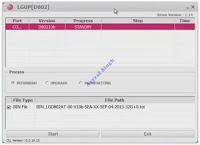
  7. Flash LG V30 using LGUP
    Flash LG V30 using LGUP
  8. From LG UP screen above, go to process tab and select Upgrade. 
  9. Then click on BIN file under file type.
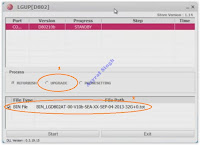
  10. Flash LG V30 using LGUP
    Flash LG V30 using LGUP
  11. Then click the button on the right side of bin file shown in the picture below.
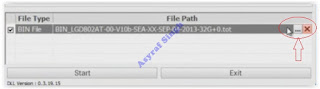
  12. Flash LG V30 using LGUP
    Flash LG V30 using LGUP
  13. This action will browse your kdz/tot file you just download.
  14. Once your kdz/tot file already in the LGUP software, now click Start.
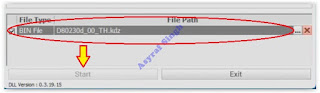
  15. Flash LG V30 using LGUP
    Flash LG V30 using LGUP
  16. Now, LGUP will start flashing process, this is indicated on the progress bar.
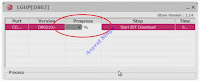
  17. Flash LG V30 using LGUP
    Flash LG V30 using LGUP
  18. Just wait until the step on progress bar shows 100% complete. Once it completed LG V30 will automatically reboot.
  19. Now, you can unplug your LG V30 device from the computer.

Wednesday, 17 January 2018

How to Flash Stock Firmware LG Stylus 3 Using LG Flashtool 2014 - KDZ Method.

How to Flash Stock Firmware LG Stylus 3 Using LG Flashtool 2014 - KDZ Method.

Flash LG Stylus 3. This is KDZ method to flash a stock firmware into  LG Stylus 3 Using LG Flashtool 2014. Use this method to fix a boot loop on your phone or back return to stock firmware. boot loop can occur when you fail to perform the latest firmware update OTA. this will cause the LG device to boot repeatedly and stop at the LG Logo. There is nothing you can do in this condition. The only thing you can do is to re-flash the stock firmware. it will also return the LG device to the factory settings.

Before this guide proceeding, here we would share LG Stylus 3 specifications. This device comes released 2017, March. Comes with 5.7 inches IPS LCD capacitive touchscreen, 16M colors. Powered by Octa-core 1.5 GHz Cortex-A53 CPU, MediaTek MT6750 chipset, and Mali-T860MP2 GPU. This device also supported by 3 GB of RAM. LG Stylus 3 runs on Android 7.0 (Nougat). This device also has the other versions (LG Stylo 3, LG K10 Pro, LG Stylus 3 LS777 (Boost Mobile), and LG Stylus 3 M400DK (India))

Now, let's start this guide.

Requirements.

  1. This guide just for LG Stylus 3 phone only.
  2. Make sure your battery has enough power or at least has 79% of battery capacity.
  3. Uninstall or don't enable the computer Anti Virus during flashing process.
  4. The LG driver must be installed correctly on your computer, if you do not have LG driver yet, please download via the following link. Here
  5. Then, you need to download LG Flashtool 2014. This flash tool will flash KDZ or TOT method. LG Flashtool 2014 can be download Here
  6. Now, download LG stock firmware for LG Stylus 3. You can download the LG stock firmware with the following methods.
    • Download LG Stock firmware by yourself. This method requires an IMEI number. For more instructions, you can follow this guide. 
    • https://goo.gl/GjSdg8
    • Download LG Stylus 3 stock Firmware directly from the following link.
      • LG Stylus 3 - Here 
      • https://goo.gl/4RA9H9
As the alternative methods, you can flash your LG Stylus 3 with LG UP and Uppercut, Use this guide.

Flashing Guide.

  1. Make sure to backup everything before proceed to flash your phone. You can use this guide to backup your phone data. Here
  2. Make sure LG flashtool and LG driver correctly installed on the computer.
  3. We highly recommend moving LG Stylus 3 stock firmware in the same folder as LG flashtool 2014 folder.
  4. Now, open LGflashtool2014.exe as administrator. How to open program window as an administrator?
    • Go to program window application (Lgflashtool2014.exe)
    • Then, right-click the application with your mouse.
    • Now, click/select open command window here
  5. If LG flashtool2014 can't open, you may need to install Visual C ++ Runtime Library. Download Here and then try the previous step again.
  6. Once the LG flash tool 2014 already open on the computer screen, you will see the following image on the screen.
  7. LG flash tool
    LG flash tool
    • 1: Select type, you can choose CDMA or 3GQCT
    • 2: from the Phone mode drop-down menu, select DIAG.
    • 3: You can click the folder icon to load KDZ firmware into LG flash tool at the select KDZ file.
    • 4: Select Normal flash or CSE Flash.
      • Normal flash, it will Flash stock firmware without losing any data.
      • CSE flash if you want upgrading, downgrading, boot looping, or just need to go back to original fresh stock. this task will delete everything stored in phone internal memory.
  8. If you select the normal flash button, then you will open read phone information windows. Now click the start button.
  9. It will open the Select country and language window. Don't check smartphone upgrade.
  10. LG flashtool select country and language
    LG flashtool select country and language
  11. Go to your phone, and then Power Off the LG Stylus 3 Plus by press and hold the power button.
  12. Then enter LG Stylus 3 into download mode. How to do it?

    • Once the LG Stylus 3 completely power off, now connect it to the computer via USB cable while pressing down the Volume Up button.
    • Once the LG Stylus 3 is connected and recognized by the computer, it should show Download Mode with “Firmware Update” written on top of the phone screen.
  13. Then, back to Select country and language window and click OK button.
  14. Now, LG flash tool 2014 will automatically launch LG Mobile Support Tool window on a computer screen.
  15. LG Mobile Support Tool
    LG Mobile Support Tool
  16. At this step you can wait for the status bar to reach 100%, this means the flashing process has been successful.
  17. Now, your phone should reboot automatically.
  18. Then, you can be saved disconnect your phone from the computer.
  19. Good Luck

Monday, 15 January 2018

How to Dump Cricket LG Harmony (M257) Stock Firmware Using LG UP.

How to Dump Cricket LG Harmony (M257) Stock Firmware Using LG UP.

Dump LG Harmony Stock Firmware. Experimenting with Android devices is challenging and fun, but sometimes we make a failure that causes the android device cannot work normally. Therefore, we need to dump or backup the current stock firmware. NAd now, we will show you how to backup or dump stock firmware LG Harmony (M257) for cricket using LG UP tool. So, when we need to flash a stock ROM, so when we need stock firmware, we do not need to download it from the official site or use our phone IMEI number.

There are some basic reasons why we should dumping stock firmware on LG harmony. First, I've mentioned the reason for dumping above. Second, all LG phones from AT&T and Cricket Wireless support firmware Over The Air Software Update (OTA update) only. So, we can not download stock KDZ firmware for the phones with the IMEI number.

Once you get the DUMP files for your LG Harmony (M257) then you can restore your phone back to stock later. or if your LG Harmony (M257) get boot loop or bricked.

Prerequisite.

  1. Make sure your phone is LG Harmony (M257) to follow this guide. because this guide only works on the current phone.
  2. Now, download and install LG USB drivers. Get the driver from here
  3. Then, download and install LG UP tool. Get the files from here
  4. Then, install LG G6 dll. Download the file from this link 
  5. https://goo.gl/L2mo66
  6. Once LG G6 dll already installed, then you need to download this file. Here 
  7. https://goo.gl/mo4oxh
    • You need to rename the LGUP_G6.dll to lgup_common.dll
    • Then, copy it to copy it to the following folder.
      • C:\Program Files (x86)\LG Electronics\LGUP\model\Common

Dumping Guide.

  1. Once you have everything ready, now put your LG Harmony (M257) into download mode. How to put LG Harmony (M257) into download mode?
    • Power off phone.
    • Then, connect it to the computer via USB cable while press and hold the Volume Up button.
    • Release the Volume Up button when the LG logo comes Up.
    • Just wait a minute.
    • Now, your LG harmony (M257) will enter download mode. And you will see "firmware update" shown at the top of the phone screen.
    • Don't unplug the USB connection until the process is complete.
  2. Now, open LG UP
  3. From the LG UP main menu click DUMP.
  4. dump LG harmony stock firmware
    dump LG harmony stock firmware
  5. Then, Click start, From the pop-up Partition List, 
  6. dump LG harmony stock firmware
    dump LG harmony stock firmware
  7. Click Select all, and then scroll down to uncheck the user's partition.
  8. Then, you need to click OK to start the DUMP process on your LG Harmony (M257) cricket.

Thursday, 11 January 2018

Guide to Fix a Bootloop and Flash Stock Firmware LG K20 Plus Using LG Flashtool

Guide to Fix a Bootloop and Flash Stock Firmware LG K20 Plus Using LG Flashtool 

Fix a Bootloop LG K20 Plus. If your LG K20 Plus stuck in a loop of reboot when attempting to booting and then stuck showing an LG logo, this called a bootloop phone. Generally, this problem is caused by a user failure in experimenting on his cell phone. for example, the user has failed to perform OTA updates to the latest firmware version before the official firmware is released by the vendor or manufacturer. Or, failure when installing custom ROM and custom recovery. then what can you do to solve the problem? simply installing a new stock firmware on your phone. then it will fix the current problem.

Before this guide proceed, here the LG K20 Plus specifications. This phone released 2016, December. Comes with 5.3 inches IPS LCD capacitive touchscreen, 16M colors. Powered by Quad-core 1.4 GHz Cortex-A53 CPU, Qualcomm MSM8917 Snapdragon 425 chipset, and Adreno 308 GPU. Also supported by 2 GB of RAM. This device runs on Android 7.0 (Nougat). There are some LG K20 Plus versions, they are for T-Mobile & MetroPCS and K20 V VS501 (Verizon).

flashing guide starts here.

Requirements.

  1. Make sure the device you are using is LG K20 Plus in order to follow this guide. To avoid your phone bricked or totally dead.
  2. Make sure your battery has enough power or at least has 75% of battery capacity.
  3. Disable all antivirus runs on your computer. 
  4. The LG driver must be installed correctly on your computer, if you do not have LG driver yet, please download via the following link. Here
  5. https://goo.gl/rCp9jN
  6. Then, you need to download LG Flashtool 2014. This flash tool will flash KDZ or TOT method. LG Flashtool 2014 can be download Here
  7. https://goo.gl/fJy62a
  8. Now, download LG stock firmware for LG K20 Plus. You can download the LG stock firmware with the following methods.
    • Download LG Stock firmware by yourself. This method requires an IMEI number. For more instructions, you can follow this guide. Here 
    • https://goo.gl/LoA4Dt
  9. Download LG K20 Plus stock Firmware directly from the following link.
  10. LG K20 Plus (LG MP260) - Here 
  11. https://goo.gl/R3pQhN
As the alternative methods, you can flash your LG K20 Plus with LG UP and Uppercut, Use this guide.

Flashing Guide.

  1. Make sure to backup everything before proceed to flash your phone. You can use this guide to backup your phone data. Here
  2. https://goo.gl/nSv2G4
  3. Make sure LG flashtool and LG driver correctly installed on the computer.
  4. We highly recommend moving LG K120 Plus stock firmware in the same folder as LG flashtool 2014 folder.
  5. Now, open LGflashtool2015.exe as administrator. How to open program window as an administrator?
    • Go to program window application (Lgflashtool2014.exe)
    • Then, right-click the application with your mouse.
    • Now, click/select 
  6. If LG flashtool2014 can't open, you may need to install Visual C ++ Runtime Library. Download Here and then try the previous step again.
  7. https://goo.gl/sv41GJ
  8. Once the LG flashtool 2014 already open on the computer screen, you will see the following image on the screen.
  9. LG flash tool
    LG flash tool
    • 1: Select type, you can choose CDMA or 3GQCT
    • 2: from the Phone mode drop-down menu, select DIAG.
    • 3: You can click the folder icon to load KDZ firmware into LG flash tool at the select KDZ file.
    • 4: Select Normal flash or CSE Flash.
      • Normal flash, it will Flash stock firmware without losing any data.
      • CSE flash if you want upgrading, downgrading, boot looping, or just need to go back to original fresh stock. this task will delete everything stored in phone internal memory.


  10. If you select the normal flash button, then you will open read phone information windows. Now click the start button.
  11. It will open the Select country and language window. Don't check smartphone upgrade.

  12. LG flashtool select country and language
    LG flashtool select country and language


  13. Go to your phone, and then Power Off the LG K20 Plus by press and hold the power button.
  14. Once the LG 20 Plus completely power off, now connect it to the computer via USB cable while pressing down the Volume Up button.
  15. Once the LG K20 Plus is connected and recognized by the computer, it should show Download Mode with “Firmware Update” written on top of the phone screen.
  16. Then, back to Select country and language window and click OK button.
  17. Now, LG flash tool 2014 will automatically launch LG Mobile Support Tool window on a computer screen.

  18. LG Mobile Support Tool
    LG Mobile Support Tool


  19. At this step you can wait for the status bar to reach 100%, this means the flashing process has been successful.
  20. Now, your phone should reboot automatically.
  21. Then, you can be saved disconnect your phone from the computer.
  22. Happy Flashing...

Monday, 8 January 2018

Flash LG K10 (2017) to Unbrick Using LG Flashtool KDZ Method

Flash LG K10 (2017) to Unbrick Using LG Flashtool KDZ Method.

Flash LG K10 (2017). This is a step by step guide how to flash stock firmware on LG K10 2017. By flashing the stock firmware into the LG device, you can fix your phone from a bootloop or brick. There are several possibilities that cause your LG phone to become a boot loop. For example, you have flashed a custom ROM to the latest version before the manufacturer release it. The current custom ROM will bring many bugs that can cause the Android operating system malfunction. so in the end, your phone becomes brick. The only way to overcome this is flash stock firmware to restore to its original state. And now, guidebelajar offer a full LG K10 (2017) firmware with the step by step flashing guide.

Before this guide go further, Now we will show LG K10 (2017) specifications. This phone has several versions, LG X400 and LG M250N. This device released 2017, February. Comes with 5.3 inches IPS LCD capacitive touchscreen, 16M colors. Powered by Octa-core 1.5 GHz Cortex-A53, MediaTek MT6750 chipset, and Mali-T860MP2 GPU. ALso supported with 2 GB of RAM. LG K10 2017 has 13 MP on primary camera and 5 MP on secondary camera. This phone runs on Android 7.0 (Nougat).

If you are ready, let us proceed with the stock installation step.

Preparation.

  1. This guide can only be applied to LG K10 (2017), make sure your device is as required, to avoid fatal damage.
  2. Before proceeding, make sure your battery fully charged. to avoid the Android system shutdown because it runs out of battery.
  3. Make sure no Antivirus run on your computer or PC to avoid the LG flash tool 2014 blocked.
  4. If LG driver is not already installed, please download and install via this link. Here
  5. Then, we need LG Flashtool 2014 to help flash a stock firmware to the phone. You can download LG flash tool 2014 via this link. Here
  6. Finally, you need to download The LG K10 2017 firmware or Stock ROM. We offer two methods how to download it.
    • first, you need to copy your device's IMEI number, and then the internet browser (Google Chrome, etc). For instruction how to download LG firmware with IMEI number, you can follow this link. 
    • https://goo.gl/LoA4Dt
  7. Second, You can go to the available link below to download the LG K10 2017 stock firmware.
    • LG X400 - Here 
    • https://goo.gl/cjBKYy
    • LG M250N - Here 
    • https://goo.gl/3v7Pky
As the alternative methods, you can flash your LG K10 (2017) with LG UP and Uppercut, Use this guide.

Flashing Guide.

  1. The full backup is required before you flash stock firmware the LG K10 2017. You can use this guide how to backup your data on Android phone. Here
  2. Make sure all required files above already installed on the computer. (LG flash tool and LG driver)
  3. Copy or move LG K10 (2017) stock firmware in the same folder as LG Flashtool folder.
  4. Then, launch LG Flash tool 2014 as administrator. You can do it by following this step.
    • Go to LG flashtool2014.exe
    • Right-click with your mouse
    • Select/click run as Administrator.
  5. If LG flashtool2014 can't open, you may need to install Visual C ++ Runtime Library. Download Here and then try the previous step again.
  6. Once the LG flash tool 2014 already open, you will see the window shown in the picture below. For the next step please follow according to the number shown in the picture.
  7. flash LG K10
    flash LG K10
    • 1: Select type, you can choose CDMA or 3GQCT
    • 2: from the Phone mode drop-down menu, select DIAG.
    • 3: You can click the folder icon to load KDZ firmware into LG flash tool at the select KDZ file.
    • 4: Select Normal flash or CSE Flash.
      • Normal flash, it will Flash stock firmware without losing any data.
      • CSE flash if you want upgrading, downgrading, boot looping, or just need to go back to original fresh stock. this task will delete everything stored in phone internal memory.

  8. If you select the normal flash button, then you will open read phone information windows. Now click the start button.
  9. It will open the Select country and language window. Don't check smartphone upgrade.

  10. flash LG K10
    flash LG K10

  11. Go to your phone, and then Power Off the LG K10 (2017) by press and hold the power button.
  12. Once the LG K10 (2017) completely power off, now connect it to the computer via USB cable while pressing down the Volume Up button.
  13. Once the LG K10 (2017) is connected and recognized by the computer, it should show Download Mode with “Firmware Update” written on top of the phone screen.
  14. Then, back to Select country and language window and click OK button.
  15. Now, LG flash tool 2014 will automatically launch LG Mobile Support Tool window on a computer screen.
  16. At this step you can wait for the status bar to reach 100%, this means the flashing process has been successful.
  17. Now, your phone should reboot automatically.
  18. Then, you can be saved disconnect your phone from the computer.
  19. Good luck.

Sunday, 7 January 2018

Guide to Flash Stock Firmware LG K8 2017 Using LG Flashtool to Fix a Bootloop.

Guide to Flash Stock Firmware LG K8 2017 Using LG Flashtool to Fix a bootloop.

Flash LG K8 2017. If you are experiencing a bootloop or bricked problem on LG k8 2017, try to solve the problem using the following method. The following method will explain in detail how to flash stock firmware on LG K8 2017. Generally, bootloop problems caused by install custom ROM before the official firmware is issued. Or fail in installing a custom recovery such as CWM or TWRP. flash stock firmware is one solution to solve a bootloop problem on LG k8 2017. Just follow this guide to flash a stock firmware on your phone.

This is LG K8 2017 specifications. This device has several versions, LG M200N (Europe), LG X240 (Russia), LG US215 (US Cellular). LG k8 2017 released 2017, April. Comes with 5.0 inches IPS LCD capacitive touchscreen, 16M colors. Powered by Quad-core 1.4 GHz Cortex-A53 CPU, Qualcomm MSM8917 Snapdragon 425 chipset, and Adreno 308 GPU. Also supported with 1.5 GB of RAM. LG K8 2017 has a 13 MP of primary camera and 5 MP of secondary camera. And this device run on Android 7.0 (Nougat) OS. Now we continue the process of flash stock firmware using LG flash tool 2014.
flash stock firmware LG K8 2017
As the alternative methods, you can flash your LG K8 2017 with LG UP and Uppercut, Use this guide.

Pre-Requirements.

  1. You need to make a full backup all data as everything will be wiped out during flashing process.
  2. Make sure to charge the battery fully, or at least you have 75% of battery capacity.
  3. Disable all antivirus run on the PC or computer.
  4. Then, Download LG flash tool 2014 to help to flash the firmware into the LG device from Here.
  5. If you do not have LG driver yet, please download through the following link. Here
  6. Now, download the LG K8 2017 KDZ firmware. You can choose two download methods that we offer below.
    • 1st. You can download LG stock firmware using IMEI on the mobile phone. for instructions on how to download it, please visit the following link. Here.
    • https://goo.gl/LoA4Dt
  7. 2nd. but if you do not want to bother, you can visit the following link to download LG K8 2017 directly. Here 
  8. https://goo.gl/b4u52k

Flash Instruction Guide.

  1. Make sure the LG driver and LG flash tool 2014 already installed on the computer.
  2. Try to put KDZ firmware files in the same folder with LG flash tool.
  3. Now run the LG flash tool as administrator. How to run a program window as an administrator?
    • Right-click the LGflashtool2014.exe.
    • Then, at the context menu select run as administrator
  4. If the LG flashtool doesn't open the window, you need to install Visual C++ Runtime Library from here and then try again.
  5. If you have successfully install LG flashtool 2014, then you will see the windows as shown in the picture below.
  6. Flash LG K8 2017
    Flash LG K8 2017
    • 1: At Select type, you can choose CDMA or 3GQCT
    • 2: Select DIAG at phone mode drop-down menu.
    • 3: You can click the folder icon to load KDZ firmware into LG flash tool at the select KDZ file.
    • 4: Select Normal flash or CSE Flash.
      • Normal flash, it will Flash stock firmware without losing any data.
      • CSE flash if you want upgrading, downgrading, bootlooping, or just need to go back to original fresh stock. this task will delete everything stored in phone internal memory.
  7. If you select the normal flash button, then you will open read phone information windows. From this window, you need to click Start button.
  8. Then you will open Select country and language window. From this window don't click smartphone upgrade. This menu for windows mobile only.
  9. Flash LG K8 2017
    Flash LG K8 2017
  10. Now, Power Off the LG K8 2017 by press and hold the power button for a long while.
  11. Once the LG K8 2017 completely power off, now connect it to the computer via USB cable while pressing down the Volume Up button.
  12. Once the LG K8 2017 is connected and recognized by the computer, it should show Download Mode with “Firmware Update” written on top of the phone screen.
  13. Then, back to Select country and language window and click OK button.
  14. Now, LG flash tool 2014 will automatically launch LG Mobile Support Tool window on a computer screen.
  15. LG Mobile Support Tool
    LG Mobile Support Tool
  16. Just wait the status bar reach 100% that indicate flashing process successfully.
  17. The flashing LG K8 2017 process will start and take some time. Once it is done, your phone will reboot automatically.
  18. And now, it's saved to disconnect your phone from the computer.
  19. Happy flashing :)

Guide Fix a Bootloop LG K7 2017 By Flashing a Stock Firmware Using LG Flashtool.

Guide Fix a Bootloop LG K7 2017 By Flashing a Stock Firmware Using LG Flashtool.

Flash Stock Firmware LG K7 2017. If your device is experiencing bootloop caused by OTA update failure, You can try to re-flash the stock firmware using this method. The following guide will show you how to flash a new stock firmware on LG K7 2017 using LG flashtool 2014. By flashing, then the firmware is corrupted causing the bootloop will be restored to the early time. So your phone will return to normal use with the original stock firmware. To start flash stock ROM on your device, please follow the step by step instructions below.

Here is the LG K7 2017 specification. This device is also known as LG K7i X230I for India, LG X230 for Russia, Kazakhstan, Poland, and Romania, LG X230K for the Philippines, LG MS330 for MetroPCS. LG K7 2017 released 2017, May. Powered by Quad-core 1.1 GHz Cortex-A53 CPU, Mediatek MT6737M chipset, Mali-T720MP2 GPU. Also supported with 2 GB of RAM and 16 GB of ROM. LG K7 2017 has 8 MP of primary camera and 5 MP of secondary camera. This phone runs on Android 6.0.1 (Marshmallow).
Ok, let's continue the flash process.
flash stock LG K7 2017
As the alternative methods, you can flash your LG K7 2017 with LG UP and Uppercut, Use this guide.

Requirement.

  1. Make sure your device is Android LG K7 2017, don't try to apply this guide to the other LG model.
  2. Download LG driver from Here.
  3. Download LG Flashtool 2014 from here
  4. Then, download LG mobile support tool from Here.
  5. Now, download LG K7 2017 stock firmware. There is two method to download the LG K7 2017 stock firmware (KDZ method).
    • The first method, download stock firmware using IMEI number on your mobile phone. see the following instructions to do it.
    • https://goo.gl/LoA4Dt
  6. The second method, you can visit the following link to download the LG K7 2017 stock firmware. This firmware is for LG MS330 Metro PCS. Here
  7. https://goo.gl/WCctRe

Step By Step Flashing a Stock Firmware.

  1. Install all driver and LG flashtool 2014 on your computer before proceeding flashing the firmware.
  2. Then, put the KDZ firmware in the same folder as the LG flashtool 2014.
  3. Flash firmware on the bootloop phone will erase all data. Therefore we suggest backup everything stored in the phone memory.
  4. Connect your phone to the computer using USB cable, and make sure it connected. if not, please check the driver already installed or not.
  5. If you encounter an error during LG flashtool installation, please download and install the following file. VC_RedistInstaller.exe
  6. Now, launch LG flashtool 2014 as administrator. How to do it?
    • right click at LG Flashtool2014.exe - then click run as administrator.
  7. Once the LG flashtool window appears on the computer screen, do the sequences according to the number shown in the picture.
  8. flash LG K7 2017
    flash LG K7 2017
    • 1: At Select type, you can choose CDMA or 3GQCT
    • 2: Select DIAG at phone mode drop-down menu.
    • 3: You can click the folder icon to load KDZ firmware into LG flash tool at the select KDZ file.
    • 4: Just click normal flash, it will Flash stock firmware without losing any data. But in the other case, you can select CSE flash if you want upgrading, downgrading, bootlooping, or just need to go back to original fresh stock. this task will delete everything stored in phone internal memory.
  9. If you select the normal flash button, you will see the window shown in the picture below. Now click Start.
  10. LG flash tool - flash LG Stylus 2 Plus
    LG flash tool - flash LG Stylus 2 Plus
  11. Now, you will see country & Language window, don't tick Smartphone upgrade checkbox. And you can click clear phone software update registry button.
  12. Then, Power Off your LG K7 2017.
  13. Then connect LG K4 2017 to the computer via USB cable while press and hold Volume Up button.
  14. Release volume up button when your phone enters download mode. with a firmware update shown at the top of the screen.
  15. enter download mode LG
    enter download mode LG
  16. Now, back to LG Flash tool 2014 window (country & Language window), you can select “Different” from the country list and then “English” from the language list. Then click OK button.
  17. Now, LG flash tool 2014 will automatically launch LG Mobile Support Tool window on a screen.
  18. LG Mobile Support Tool
    LG Mobile Support Tool
  19. Just wait the status bar reach 100% that indicate flashing process successfully.
  20. At this step, your LG K7 2017 will reboot automatically, then you need to close or exit the current windows.
  21. Then, disconnect your phone from the computer.

Friday, 5 January 2018

Guide to Flash Stock Firmware LG K4 2017 or LG M160 Using LG FlashTool.

Guide to Flash Stock Firmware LG K4 2017 or LG M160 Using LG FlashTool.

Flash Firmware LG K4 2017. If you frequently experiment on Android devices, surely you will get to know some terms of the device. As an example, rooting, OTA updating, flashing a custom ROM, flashing a custom recovery, kernel, etc. Actually, they do this is to get a great feature to make their phone more powerful. All of these actions will cause several bugs or may brick your phone. If your LG k4 2017 is bricked or bootloop, you can restore the original stock firmware and flash LG K4 2017 using LG Flash tool KDZ method. Once your phone successfully flashed with the stock ROM using LG flashtool, you can also unroot your device again.

Before flashing here you can know more about LG K4 2017 specifications. This phone is known as with LG K4 M160, LG Fortune (Cricket Wireless), LG Phoenix 3 (АТ&Т). Released Rele March. This device powered by Quad-core 1.1 GHz Cortex-A7 CPU, Qualcomm MSM8909 Snapdragon 210 chipset, and Adreno 304 GPU.

Now, lets start to flashing LG K4 2017.
As the alternative methods, you can flash your LG K4 2017 with LG UP and Uppercut, Use this guide.

Prerequisite.

  1. This guide for LG K4 2017 only, don't try to follow this guide on other LG model.
  2. Now, download and then install LG driver on your PC. Here
  3. Then, download and install LG Flash tool on your computer. Here
  4. Next, download and install LG mobile support tool. Here
  5. Now, Download LG K4 2017 | LG M160 Stock firmware from the following link below.
    • You can download it yourself using your favorite IMEI number and favorite browser on your computer. how to download LG stock firmware using IMEI number? See this guide.
    • https://goo.gl/LoA4Dt
    • The second method, download LG K4 2017 from the following link. Here
    • https://goo.gl/XNzHUh

Flashing Guide.

  1. Make sure LG driver, LG flashtool, and LG mobile support tool already installed on the computer.
  2. Then, copy the KDZ firmware in the same folder as the LG flashtool folder. We suggest putting in the desktop folder.
  3. You must backup everything before proceeding flash the stock firmware.
  4. Make sure LG driver successfully installed on the computer, and then check your device successfully connected or not.
  5. When you got the warning during LG flash tool installation, try to get and install the VC_RedistInstaller.exe
  6. Once LG K4 2017 successfully connected to the PC, now open the LG flash tool 2014 as administrator. (right click at LG Flashtool2014.exe - select run as administrator).
  7. run as administrator - LG flash tool
    run as administrator - LG flash tool
  8. Once LG Flash tool 2014 comes up on the computer screen, now just do the following task.
  9. flash LG K4 2017
    flash LG K4 2017
    • 1: At Select type, you can choose CDMA or 3GQCT
    • 2: Select DIAG at phone mode drop-down menu.
    • 3: You can click the folder icon to load KDZ firmware into LG flash tool.
    • 4: Just click normal flash, it will Flash stock firmware without losing any data. But in the other case, you can select CSE flash if you want upgrading, downgrading, bootlooping, or just need to go back to original fresh stock. this task will delete everything stored in phone internal memory.
  10. If you click the normal flash button, then you will see next window as shown in the picture below. On this window, you can continue the process by click Start button.
  11. LG flash tool - flash LG Stylus 2 Plus
    LG flash tool - flash LG Stylus 2 Plus
  12. Now, you will see country & Language window, don't tick Smartphone upgrade checkbox. And you can click clear phone software update registry button.
  13. Now, go to your phone and Power Off your LG K4 2017.
  14. Then connect LG K4 2017 to the computer via USB cable while press and hold Volume Up button.
  15. Release volume up button when your device enters download mode. with a firmware update shown at the top of the screen.
  16. enter download mode LG
    enter download mode LG
  17. Now, back to LG Flash tool 2014 window (country & Language window), you can select “Different” from the country list and then “English” from the language list. Then click OK button.
  18. Now, LG flash tool 2014 will automatically launch LG Mobile Support Tool window on a screen.
  19. LG Mobile Support Tool
    LG Mobile Support Tool
  20. This window will inform you about the flashing process at the progress bar. The flashing process will run without your intervention.
  21. Once progress bar reaches 100% completed, your phone will automatically reboot, then you need to click the exit button.
  22. Now, it safely removes your phone from the computer.
  23. Once the flashing process is done, your phone should normally boot and enter the phone menu.
  24. The first boot will take a bit of time until your phone ready to set up.

Thursday, 4 January 2018

Guide Flash Stock Firmware LG K3 2017 (LG US110) to Fix a Bootloop Using LG Flashtool.

Guide Flash Stock Firmware LG K3 2017 (LG US110) to Fix a Bootloop Using LG Flashtool.

Flash LG K3 2017 - LG US110. The following guide will show you how to flash a stock firmware LG K3 2017 or LG US110. You can use this method to solve the LG K3 2017 bootloop problem. Android devices can bootloop due to OTA update failure, or when the people flash any custom recovery like CWM or TWRP recovery. Bootloop can be interpreted android device failed to boot and boot repeatedly. Flashing a new firmware may fix the current problem. This is KDZ method flashing using LG Flashtool.

This is LG K3 2017 specifications, this device also called by LG US110, this device released 2017, April. comes with 4.5 inches IPS LCD capacitive touchscreen, 16M colors. Powered by Quad-core 1.1 GHz Cortex-A7 CPU, Qualcomm MSM8909 Snapdragon 210 chipset, Adreno 304. Supported by 1 GB of RAM and 8 GB of internal storage. LG K3 2017 has 2 MP of secondary camera and 5 MP of primary camera. This device runs on Android 6.0.1 (Marshmallow).

Make sure you're already and understand to do this task. Ok, let's start this guide.
flash firmware LG K3 2017
As the alternative methods, you can flash your LG K3 2017 with LG UP and Uppercut, Use this guide.

Prerequisite.

  1. Make sure your device is LG K3 2017 to continue following this guide.
  2. Now, download and then install LG driver on your PC. Here
  3. Then, download and install LG Flash tool on your computer. Here
  4. Next, download and install LG mobile support tool. Here
  5. Now, Download LG K3 2017 | LG US110 Stock firmware from the following link below.
    • You can download it yourself using your favorite IMEI number and favorite browser on your computer. how to download LG stock firmware using IMEI number? See this guide.
    • or, you can directly go to the following website to download LG K3 2017 firmware. Here

Flashing Stock Firmware LG K3 2017.

  1. Make sure to extract and install all prerequisite files above on the local computer you used to flash the firmware LG K3 2017.
  2. Put the KDZ firmware in the same folder as the LG flashtool folder. For easy folder access put it on the desktop.
  3. Make sure to backup everything stored in the phone internal memory. Flashing process will delete everything.
  4. If LG K3 2017 is not detected on the computer, please check your driver and make sure it successfully installed.
  5. When you got the warning during LG flash tool installation, try to get and install the VC_RedistInstaller.exe
  6. Once LG K3 2017 successfully detected on the computer, now launch the LG flash tool 2014 as administrator. (right click at LG Flashtool2014.exe - select run as administrator).
  7. run as administrator - LG flash tool
    run as administrator - LG flash tool
  8. Once LG Flash tool 2014 comes up on the computer screen, now just do the following task.
  9. lg flash tool
    lg flash tool
    • 1: At Select type, you can choose CDMA or 3GQCT
    • 2: Select DIAG at phone mode drop-down menu.
    • 3: You can click the folder icon to load KDZ firmware into LG flash tool.
    • 4: Just click normal flash, it will Flash ROM without losing any data. But in the other case, you can select CSE flash if you want to upgrading from a stock firmware, this task will delete everything stored in phone internal memory.
  10. If you click the normal flash button, then you will see next window as shown in the picture below. On this window, you can continue the process by click Start button.
  11. LG flash tool
    LG flash tool
  12. Now, you will see country & Language window, don't tick Smartphone upgrade checkbox. And you can click clear phone software update registry button.
  13. Now, go to your phone and Power Off your LG K3 2017.
  14. Then connect LG K3 2017 to the computer via USB cable while press and hold Volume Up button.
  15. Release volume up button when your device enters download mode. with a firmware update at the phone screen as shown in the picture below.
  16. Now, back to LG Flash tool 2014 window (country & Language window), you can select “Different” from the country list and then “English” from the language list. Then click OK button.
  17. Now, LG flash tool 2014 will automatically launch LG Mobile Support Tool window on a screen.
  18. LG Mobile Support Tool
    LG Mobile Support Tool
  19. This window will inform you about the flashing process at the progress bar. The flashing process will run without your intervention.
  20. Once progress bar reaches 100% completed, your phone will automatically reboot, then you need to click the exit button.
  21. Now, it safely removes your phone from the computer.
  22. Once the flashing process is done, your phone should normally boot and enter the phone menu.
  23. Now, you can continue to make first set up as the first time you bought the LG K3 2017.

Sunday, 10 December 2017

Flash Stock Firmware 10F LG G6 H870 KDZ Method Using LGUP & Uppercut.

Flash Stock Firmware 10F LG G6 H870 KDZ Method Using LGUP & Uppercut.

Flash Stock ROM 10F LG G6 H870. The following guide will explain how to solve boot loop or bricked issue on Android LG G6. Or you can also use this guide to upgrade to the current Android version. This is 10F stock firmware, which 10f is the second official LG Android 7.0 Nougat update for open UE devices. To flash the 10f stock firmware, we need the LGUP and Uppercut.

We know that LGUP tool is a new flashing tool to flash kdz/tot/bin stock ROM format into the LG smartphone device. LGUP work only on Windows Operating System. But, not all LG devices are supported by LGUP flash tool. Therefore, we need Uppercut. the Uppercut allows LGUP to instantly work with a ton of different LG phone models. So you do not need to be confused to find specific model files.

To flash a stock ROM LG G6 using LGUP tool, simply install LGUP tool. Then double-click the uppercut.exe and LGUP will open and detect your device automatically. For more detail information you can visit the forum-xda-developer here

So, what do we need to flash stock ROM 10f to LG G6? The following are the requirements.

Requirement.

  1. A computer with Windows OS based.
  2. LG's Windows USB drivers. Here
  3. LGUP tool Here
  4. Download Uppercut from Here
  5. Download Stock ROM 10f for LG G6.
    • H87010f_00_OPEN_EU_OP_0417.kdz Here 

Instruction How to flash LG G6.

  1. Make sure all required files above are successfully downloaded on your computer. Then, do the following step.
    • Install LG USB Driver
    • Install the latest LG UP software
    • Extract or Unzip Uppercut.zip
  2. Then, double-click the uppercut.exe before running LGUP. Uppercut.exe requires LGUP 1.14 (not 1.11) installed on the computer.
  3. uppercut LGUP
    uppercut LGUP
  4. Now, put your LG G6 Smartphone into download mode, you can manually do it by ;
  5. https://goo.gl/Y5SGeF
    • Turn Off your LG G6 Smartphone device.
    • Then press and hold Volume UP button while connecting your LG G6 Smartphone to the computer using the USB cable.
  6. Then run LGUP tool.
  7. Wait a moment until LGUP detect and recognize your LG smartphone. This will install a necessary USB Drivers for your device.
  8. Now, your LGUP should show up on your computer screen.
  9. Flash LG G6 H870 using LGUP
    Flash LG G6 H870 using LGUP
  10. From LG UP screen above, go to process tab and select Upgrade.
  11. Then click on BIN file under file type.
  12. Flash LG G6 H870 using LGUP
    Flash LG G6 H870 using LGUP
  13. Then click the button on the right side of bin file shown in the picture below.
  14. Flash LG G6 H870 using LGUP
    Flash LG G6 H870 using LGUP
  15. This action will browse your kdz/tot file you just download.
  16. Once your kdz/tot file already in the LGUP software, now click Start.
  17. Flash LG G6 H870 using LGUP
    Flash LG G6 H870 using LGUP
  18. Now, LGUP will start flashing process, this is indicated on the progress bar.
  19. Flash LG G6 H870 using LGUP
    Flash LG G6 H870 using LGUP
  20. Just wait until the step on progress bar shows 100% complete. Once it completed LG G6 will automatically reboot
  21. Now, you can unplug your LG G6 device from the computer.